WireGuard uses public-key peers and a deliberately small protocol design. Official implementations and clients cover Linux, Windows, macOS, BSD, Android and iOS.
THE IDEA, MAPPEDA peer-to-peer tunnel.
01
Public-key peer
Credentials identify the authorized endpoint.
02
Encrypted connection
Protocol and configuration define the tunnel.
03
Allowed routes
Routes and access policy decide what is reachable.
Conceptual topology, not a deployment we tested. Follow the project documentation for supported configurations and operational requirements.
VPN protocol & implementations
A compact tunnel for personal remote access and networks you administer.
Software cost and scope
No software license fee for the listed open-source edition. Hosting, bandwidth, hardware and administration are separate.
License: Component-specific free software licenses, including GPL-2.0 and MIT. Official project and implementation choices; licenses differ by component.
You configure a reachable peer/server, keys, routes, DNS and firewall behavior.
Protocol: WireGuard.
SEE THE CONTROLS. FOLLOW THE STEPS.
Connect with WireGuard on Windows
Windows client · 7 steps
Connect an existing, authorized gateway. Server deployment is separate.
What you’ll do: Import your device’s configuration, connect to its peer, check the intended route, and disconnect.
Documentation checked 2026-11-09. Source-based walkthrough; we have not deployed or tested this connection. Pictures are labelled by origin. Publisher screenshots can show older interfaces; use the linked current documentation when your version differs.
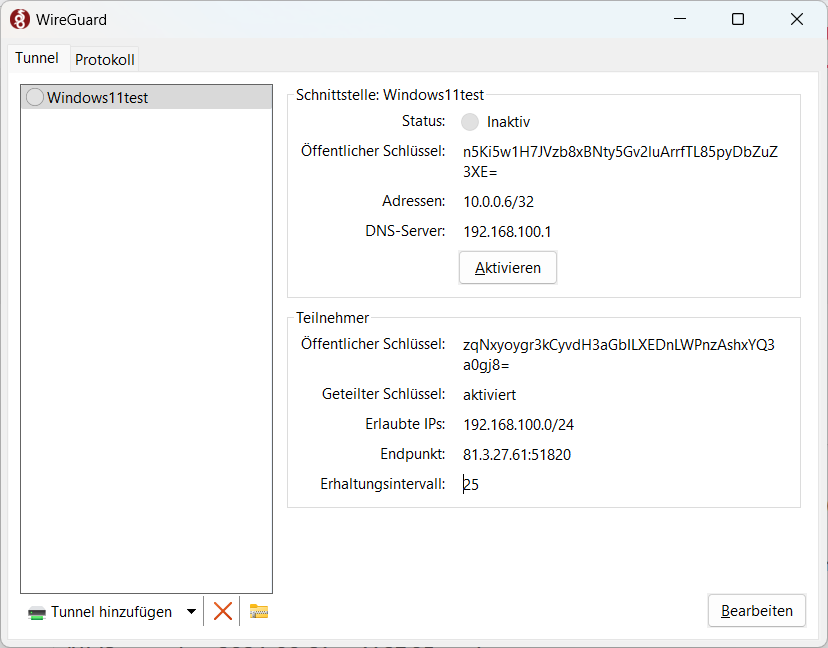
Version scope: Official WireGuard Windows workflow. Proton’s English screenshots and IPFire’s German Windows 11 screenshot are published reference examples; exact client builds are not stated. The IPFire image is from September 2024. Your own gateway and routes may differ.
Before you start
Install the official Windows client.
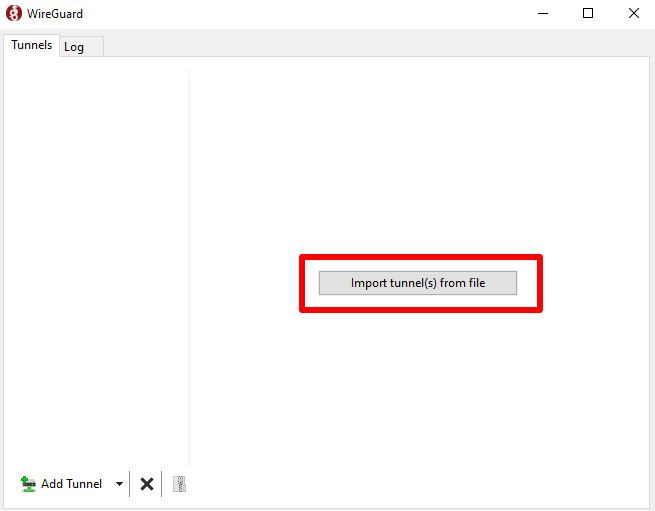
Obtain a trusted .conf profile and confirm the gateway, routes and DNS with its operator.
Configuration
A .conf file issued for this device by your gateway operator.
Destination
The private resource or permitted internet route you want to use.
Expected settings
Endpoint, AllowedIPs and DNS supplied by the operator.
Use your own authorized account and configuration. Keep private keys, QR codes and sign-in codes out of shared pictures.
0 of 7 steps marked complete
Checkmarks help you follow the guide; they do not verify a connection. They reset when you reload.
STEP 01
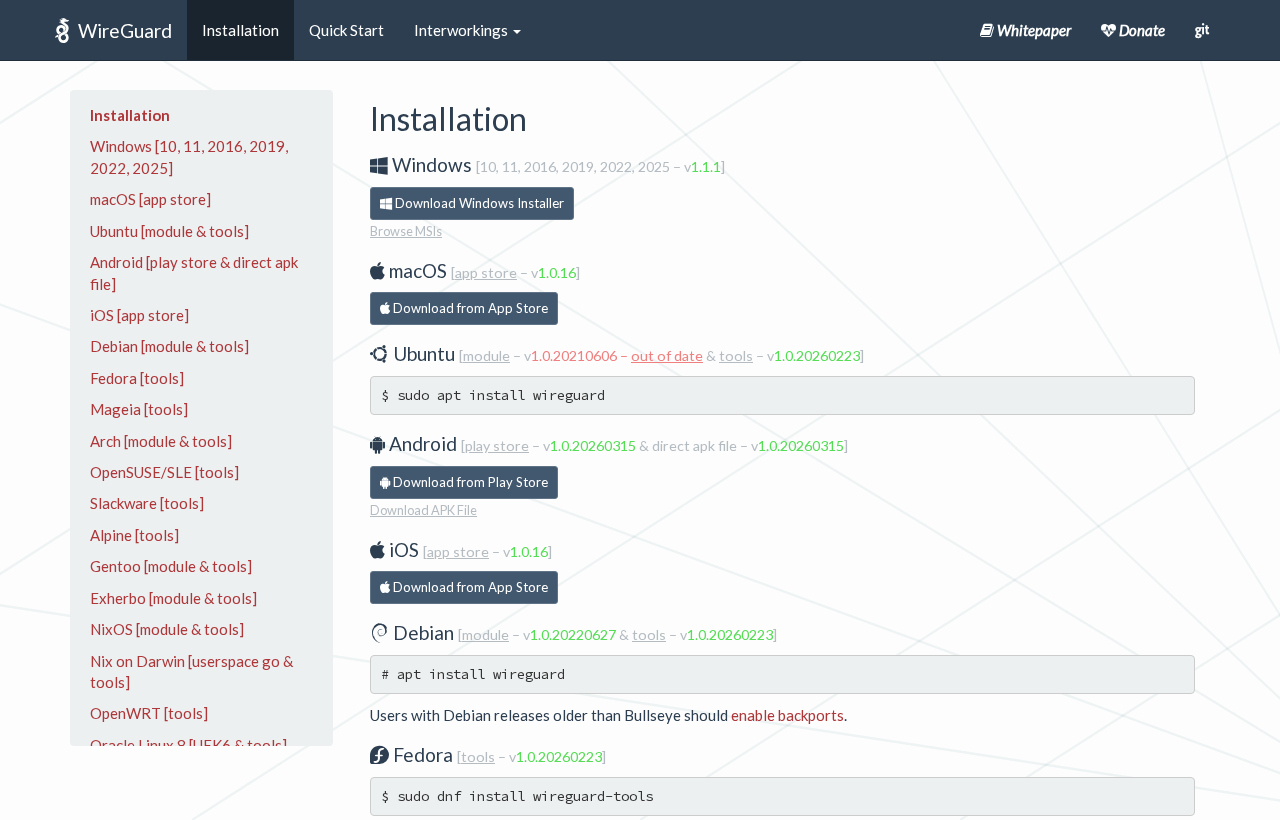
Install the official Windows client
Start with the client for your operating system.
Open the official installation page linked below and choose Windows.
Run the installer with the required permission, then open WireGuard.
What you should see
The WireGuard client opens; installing it alone has not created a tunnel.
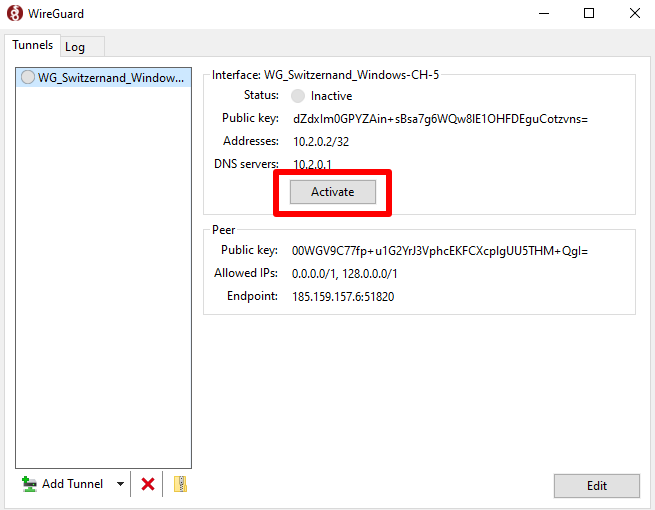
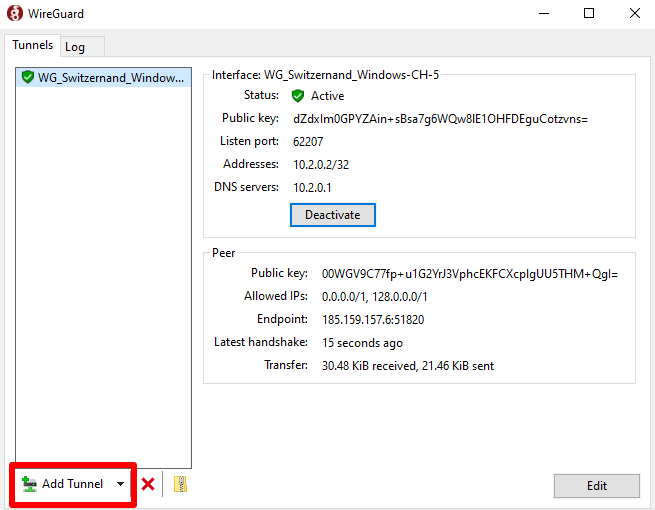
An endpoint and a destination route answer different questions. The English publisher example shows two IPv4 default-route halves; that is not the private-subnet example above or proof that IPv6 is covered.
Confirm whether this profile reaches a private subnet or routes internet traffic.
Ask the operator about any unexpected route or resolver before changing it.
What you should see
The intended destinations are covered by the profile’s allowed routes.
Try the private resource you intended to reach. If the profile routes internet traffic, check the resulting exit and DNS as well. These checks are not an anonymity guarantee.
The named peer has a recent handshake after traffic is sent.
The intended private resource or permitted internet destination works.
The routes match the operator’s intended scope.
You can deactivate the tunnel and explain what then uses the ordinary connection.
If it does not work
If activation succeeds but traffic fails, recheck the operator’s peer registration, endpoint reachability and allowed routes before changing settings.
Tunnel activates but nothing loads
Generate traffic to the authorized destination, then inspect the peer handshake. Confirm the endpoint, peer registration and AllowedIPs with the operator; an active switch is not a working remote connection.
Ask whether the profile is intentionally split routed. A private subnet in AllowedIPs does not mean all internet traffic uses the peer.
Someone needs a log or picture
Remove private keys and credentials before sharing it. Replace an exposed device key with the operator; hiding the message afterward does not revoke a key.
Stop or roll back deliberately
Choose Deactivate for this tunnel. Recheck the intended route afterward. If you enabled on-demand or automatic connection elsewhere, review that setting before assuming the tunnel will stay off.
Peer identity and endpoint handling depend on deployment. Using WireGuard alone does not establish a commercial provider’s retention policy.
Your hosting arrangement, physical server location, account records and browser identity still matter. Plan credential management, updates, DNS, routing and connection-failure behavior before relying on a deployment.
Documentation reviewed 2026-11-06. Project documentation reviewed; no independent security testing performed by StealthVPN. Use the project’s current installation and security guidance; platform support and configuration choices can change.
 (opens in a new tab)
 (opens in a new tab)
 (opens in a new tab)
 (opens in a new tab)
 (opens in a new tab)